


ERP implementation is the single most consequential operational decision most manufacturers will make, and the one most likely to go sideways. Not because the software is wrong, but because the implementation is. This guide walks discrete manufacturers through the entire journey, from recognizing when you’ve outgrown your current systems to selecting the right ERP, executing a structured implementation, and measuring the results.
ERP projects fail because of poor implementation, not poor software. Preparation, people, and process alignment determine whether a system delivers value or collects dust.
Not every manufacturer needs a full mid-market ERP. Knowing when you’re ready, and when you’re not, saves time and money.
A structured gap analysis before vendor selection prevents you from buying features you don’t need or missing capabilities you do.
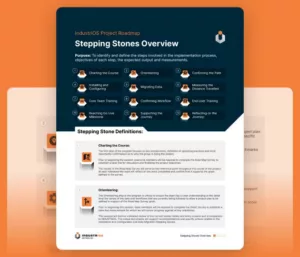
The INDUSTRIOS SteppingStones methodology breaks implementation into 12 measurable steps that reduce risk and eliminate surprises.
Successful ERP implementation delivers measurable ROI through reduced costs, faster fulfillment, improved accuracy, and the operational agility to scale without adding chaos.
ERP failures rarely happen because the technology is deficient. They happen because processes weren’t fully understood before configuration began, because data wasn’t properly cleaned before migration, because users weren’t trained with real scenarios, or because go-live happened before the organization was genuinely ready. The software is only half the equation. The other half, the half that determines whether the system actually works on your shop floor, is implementation.
INDUSTRIOS was built by people who live inside discrete manufacturing operations, and the implementation methodology reflects that reality. The approach, called SteppingStones, is a guided, step-by-step roadmap that prioritizes understanding how your business actually operates today, designing workflows that fit your production environment, simulating processes before go-live, and training users with real company-specific procedures. When you go live with INDUSTRIOS, there are no surprises because you’ve already walked the path.
 Stepping Stones
Read Article →
Stepping Stones
Read Article →
There’s a pattern that plays out across manufacturing companies of all sizes. The accounting side of the business is under control. QuickBooks or a similar system handles treasury functions well enough. But the operations side is getting away from you. Inventory counts don’t match what the system says. Quoting a job takes longer than it should because the data lives in three different spreadsheets. Production scheduling happens in someone’s head or on a whiteboard. Customer delivery dates get missed because nobody had real-time visibility into what was actually happening on the floor.
These are the signals. When manual workarounds multiply faster than you can document them, when growth is exposing cracks in your ability to track jobs, materials, and labor, and when your team spends more time hunting for information than acting on it, you’ve outgrown your current setup. The operational complexity has crossed a threshold that QuickBooks and spreadsheets can no longer support on their own.
If 3 or more apply, it’s time for a structured gap analysis →
 ERP Gap Analysis: Finding What’s Missing in Your Manufacturing Systems
Read Article →
ERP Gap Analysis: Finding What’s Missing in Your Manufacturing Systems
Read Article →
If this sounds familiar, the next step is a structured evaluation of where your gaps actually are. Start with ERP Gap Analysis: Finding What’s Missing in Your Manufacturing Systems.
Not every manufacturer needs a full mid-market ERP system. If the following describe your operation, a full implementation may be premature:
That’s perfectly fine. Many small manufacturers operate effectively this way up to a certain growth threshold.
When you do start hitting limits, a hybrid approach is often smarter than replacing everything. Instead of overhauling your entire financial system to solve an operations problem, you can layer manufacturing capabilities on top of what you already use:
For a deeper look at when and why that hybrid path makes sense, read Why Integrate QuickBooks to a Mid-Market Manufacturing ERP System.
Before you start comparing vendors or sitting through demos, you need to understand exactly where your operation stands today and where it needs to be. An ERP gap analysis is a systematic evaluation that compares your current manufacturing processes (production scheduling, inventory management, quality control, financial reporting) against the capabilities of modern ERP systems. It answers three fundamental questions: where are you now, where do you want to be, and what needs to happen to get there.
The four most common types of gaps are:
Gap analysis follows a simple three-step process:
The process involves documenting your current state in detail (process flows, data flows, performance metrics), defining your future state requirements tied to specific business goals, and then conducting a structured comparison to identify process gaps, functional gaps, integration gaps, and performance gaps. The most important step comes after the gaps are identified: prioritizing them by business impact and implementation feasibility so your team focuses effort where it counts most. A thorough gap analysis prevents manufacturers from buying features they’ll never use while missing capabilities they desperately need.
For the full step-by-step methodology, including tools and assessment templates, see ERP Gap Analysis: Finding What’s Missing in Your Manufacturing Systems.
ERP Gap Analysis: Finding What’s Missing in Your Manufacturing Systems
Read Article →
Different production models demand different ERP capabilities. If the system doesn’t align with how your production actually works, no amount of implementation excellence will close that gap:
Once you know your production type, follow a practical selection sequence:
For the full 8-step selection framework with comparison tables and a printable checklist, read How to Choose Manufacturing ERP Software.
For manufacturers in the $50M–$500M range, the biggest implementation risk is over-engineering the project. More than half of mid-market ERP implementations fall short on objectives, cost, or schedule, usually because they chase enterprise-level complexity that mid-market operations don’t need.
The antidote is ruthless focus. Start with the core functions that drive value: production planning, inventory optimization, shop floor control, quality management, and BOM management. Get those right first. Limit customization to where it delivers clear operational return, and phase your rollout so early wins build momentum before expanding.
For the full playbook on avoiding over-engineering, including five keys to implementation success and the most common pitfalls, read Mid Market ERP Implementation: Avoiding Over-Engineering for Industrial Manufacturers.
Deployment strategy is a decision that affects how your manufacturing operation runs, grows, and adapts to change. Cloud ERP offers faster deployment (weeks instead of months), lower upfront costs through subscription pricing, reduced IT workload since the provider handles maintenance and security, and remote access from any device. On-premise ERP provides complete data control with manufacturing data on your own servers, superior local processing performance for high-volume real-time operations, offline capability during internet outages, and more flexibility for deep customization.
| Factor | Cloud ERP | On-Premise ERP |
| Deployment Speed | Weeks | Months |
| Upfront Cost | Lower (subscription) | Higher (capital investment) |
| IT Workload | Provider-managed | Managed in-house |
| Data Control | Hosted off-site | Stored on your own servers |
| Offline Access | Requires an internet connection | Fully operational offline |
| Customization | Configuration-based | Greater flexibility for customization |
| Remote Access | Accessible from any device, anywhere | Typically requires a VPN or additional setup |
This option is universally better. The right choice depends on your budget and cash flow preferences, internal IT resources, internet reliability at your facility, growth plans, compliance requirements, and timeline. INDUSTRIOS supports both cloud and on-premise deployment. The cloud option is delivered through partnership with TierPoint, and on-premise is installed directly on your infrastructure.
For the complete side-by-side comparison including a manufacturing-type comparison chart, see On-Premise or Cloud ERP for Manufacturers: Which Makes Sense for You?
 On-Premise or Cloud ERP for Manufacturers: Which Makes Sense for You?
Read Article →
On-Premise or Cloud ERP for Manufacturers: Which Makes Sense for You?
Read Article →
The SteppingStones methodology is a 12-step implementation framework built specifically for discrete manufacturers. It moves from planning through execution to post-go-live reflection, with measurable benchmarks at every stage. Rather than rushing toward launch, SteppingStones ensures that by the time you go live, your team has already walked the entire path. The 12 steps are organized across four phases, each covered in depth in its own dedicated article.
Phase 1: Planning and Alignment (Steps 1 to 3) begins with executive leaders clarifying the “why” through the INDUSTRIOS Road Map Survey, then benchmarking current operations through the ISAAC Survey, and finally building a project plan that allocates resources to areas needing the most attention. These three steps create the foundation that everything else rests on. For the full breakdown, see ERP Project Roadmap: Setting Your Project Up for Success with the First Three Stepping Stones.
 ERP Project Roadmap: Setting Your Project Up for Success with the First Three Stepping Stones
Read Article →
ERP Project Roadmap: Setting Your Project Up for Success with the First Three Stepping Stones
Read Article →
Phase 2: Configuration and Data (Steps 4 to 6) is where plans become working systems. Your INDUSTRIOS environment gets configured based on everything learned during planning: user roles, workflow rules, reporting templates, all tailored to your specific operation, not a generic setup. Data migration follows with clear quality standards, piloting before live operation, and assigned responsibilities for data cleansing. The phase closes with an honest measurement of progress against the original roadmap. For the full detail, see ERP Implementation Process: Turning Plans Into Action with INDUSTRIOS.
 ERP Implementation Process: Turning Plans Into Action with INDUSTRIOS
Read Article →
ERP Implementation Process: Turning Plans Into Action with INDUSTRIOS
Read Article →
Phase 3: Training and Workflow (Steps 7 to 9) shifts focus from systems to people. Core team power users get hands-on training built with real company data, not generic examples. The team then walks step-by-step through actual business processes, confirming trigger points, hand-offs, and outcomes while building documentation that serves both daily operations and future onboarding. End user training follows, focused only on what’s relevant to each role, with cross-training opportunities that promote flexibility. For the complete training framework and best practices, see ERP User Training: Building Knowledge and Confidence for INDUSTRIOS Success.
 ERP User Training: Building Knowledge and Confidence for INDUSTRIOS Success
Read Article →
ERP User Training: Building Knowledge and Confidence for INDUSTRIOS Success
Read Article →
Phase 4: Go Live and Beyond (Steps 10 to 12) brings the project to life. Opening balances are entered, master files and security are verified, and core processes get a final review. The INDUSTRIOS team stays on-site after go-live, working side-by-side with your team through first payrolls, month-ends, and any unexpected situations. The final step is a candid post-project review: what worked, what needs more attention, and what becomes the action plan for continuous improvement. For the full go-live walkthrough, see ERP Go Live: Final Steps and Lessons from the INDUSTRIOS Project Roadmap.
 ERP Go Live: Final Steps and Lessons from the INDUSTRIOS Project Roadmap
Read Article →
ERP Go Live: Final Steps and Lessons from the INDUSTRIOS Project Roadmap
Read Article →
Theory is one thing. Proof is another. When SmithCo Manufacturing, the number one side dump manufacturer in the United States, went looking for an ERP solution, they had two non-negotiable requirements: a partner with genuine manufacturing expertise who would stay invested from start to finish, and a robust, highly integrated system capable of handling their operational complexity.
INDUSTRIOS delivered the project on time, on budget, and true to the estimates originally quoted. The system integrated seamlessly with QuickBooks, AutoCAD, and SolidWorks, eliminating any changes to SmithCo’s existing financial framework and saving them time and money. As Scott Lovell, Operations Manager at SmithCo, put it: “They will stay with you until the job is done and will continue to support you as your business grows with the software.” For the complete story, see On-time On-Budget ERP Implementation.
 On-time On-Budget ERP Implementation
Read Article →
On-time On-Budget ERP Implementation
Read Article →
The return on a well-implemented ERP system shows up across every corner of a manufacturing operation. Among INDUSTRIOS customers, the results speak in concrete numbers: Altron Automation halved purchasing costs and achieved 99.5% inventory accuracy. Cam Tran cut payroll processing time by 80%. Leone Fence increased customer satisfaction by 40% through real-time inventory visibility and automated scheduling. Universal Stenciling now fulfills 90% of orders within 24 hours while managing over 3,000 raw materials with accuracy. You can explore these results and others on the INDUSTRIOS success stories page.
 Success Story: SmithCo Mfg. Inc. improves overall operations
Read Article →
Success Story: SmithCo Mfg. Inc. improves overall operations
Read Article →
INDUSTRIOS doesn’t operate in isolation. For manufacturers using Sage 300 as their financial backbone, INDUSTRIOS provides two-way integration that connects manufacturing operations with a world-class set of financial applications. Sage 300 serves tens of thousands of companies across a range of industries, and the integration ensures that data flows cleanly between your shop floor and your ledger. For background on the Sage 300 platform and its evolution, see Sage 300 and 300C Short-Term Roadmap and Sage 300 2018.0 Release.
 Sage 300 and 300C Short-Term Roadmap
Read Article →
Sage 300 and 300C Short-Term Roadmap
Read Article →
 Sage 300 2018.0 Release Available from August 1, 2017
Read Article →
Sage 300 2018.0 Release Available from August 1, 2017
Read Article →
For manufacturers who prefer to keep QuickBooks as their accounting system, INDUSTRIOS supports a hybrid ERP approach that adds manufacturing-specific capabilities (production management, inventory control, scheduling, job costing) without requiring a wholesale change to your financial platform. And for engineering-driven operations, integration with tools like AutoCAD and SolidWorks ensures that product data flows from design through production without re-keying or disconnected systems.
INDUSTRIOS integrates with leading financial and engineering software to create a connected manufacturing environment where information flows seamlessly between departments.
Sage 300 for financial management QuickBooks for accounting
INDUSTRIOS Manufacturing ERP acts as the central platform, connecting business operations with financial and engineering systems.
AutoCAD for engineering design SolidWorks for 3D product design
By enabling two-way data synchronization between finance, manufacturing, and engineering, INDUSTRIOS helps eliminate duplicate data entry, reduce errors, and ensure every team is working from the same accurate, up-to-date information.
ERP implementation for manufacturers doesn’t succeed because of software alone. It succeeds because of preparation, validation, and disciplined execution, and it fails when any of those are shortchanged. The manufacturers who get the most from their ERP investment are the ones who take the time to understand their current gaps before choosing a system, who right-size the implementation instead of chasing every feature on the menu, who invest in training their people with real data and real scenarios, and who treat go-live as a milestone rather than a finish line.
Every article linked throughout this guide goes deeper on a specific piece of that puzzle. Together, they form a complete resource for any manufacturer evaluating, planning, or executing an ERP implementation. If you’re ready to see how these principles come together in practice,

Download 1 of 11 Continuous
Improvement Templates